SOC Automation
Configuring a Wazuh Active Response rule to quarantine an endpoint + a Shuffle workflow that creates a case on TheHive and sends an email alert.
Objectives
In this project, we will configure a Wazuh Active Response (AR) rule to quarantine an endpoint that has Mimikatz activity detected on it, plus a Shuffle workflow that automatically creates a case on TheHive and sends an email alert about the incident. This basically simulates the containment phase of incident response.
This is mainly a proof of concept and does not address any specific scenarios. There will always be something to consider and something to improve.
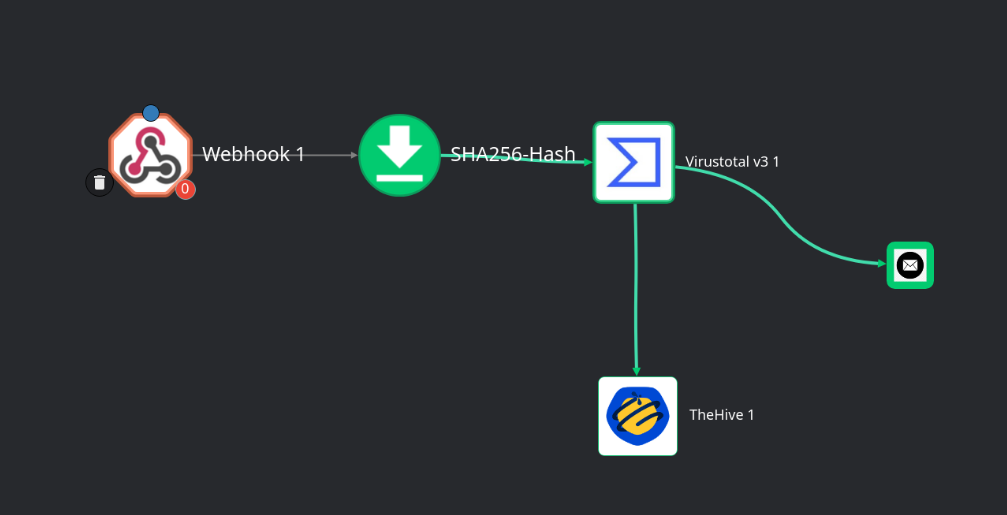
The Shuffle workflow:
- Ingests a Wazuh log when a specific rule is triggered
- Extracts IoCs from the log (ex. file hash)
- Sends the file hash to the VirusTotal API for enrichment
- Creates a case on TheHive
- Sends an email alert
Prerequisites
This project is an extension of my (locally hosted) cybersecurity home lab. You do not need every single VM from my lab set up and configured, however the following is required:
- Wazuh VM (v4.9.2)
- Windows VM (I am using Windows 10)
- Joining the VM to an Active Directory domain is not necessary
- Sysmon must be installed and configured to forward logs to Wazuh
- (optional) Ubuntu Desktop VM (24.04 LTS)
- Mainly used to SSH into the servers and access the web GUI of our apps. You can do this from the Windows VM, but I recommend using Ubuntu instead.
Of course, make sure these VMs can communicate with each other.
Additionally, we will need a custom Wazuh rule that detects Mimikatz activity on the Windows endpoint. See these pages:
- Sysmon Deployment
- You do not need the AD file share set up. Just follow the Sysmon Download and Installation + Forwarding Sysmon Logs to Wazuh sections.
- Wazuh & Sysmon Telemetry Test
Topology
Note: TheHive runs on a 14 day trial, so the VM associated with TheHive will be deleted soon. I will keep the Docker/Shuffle VM.
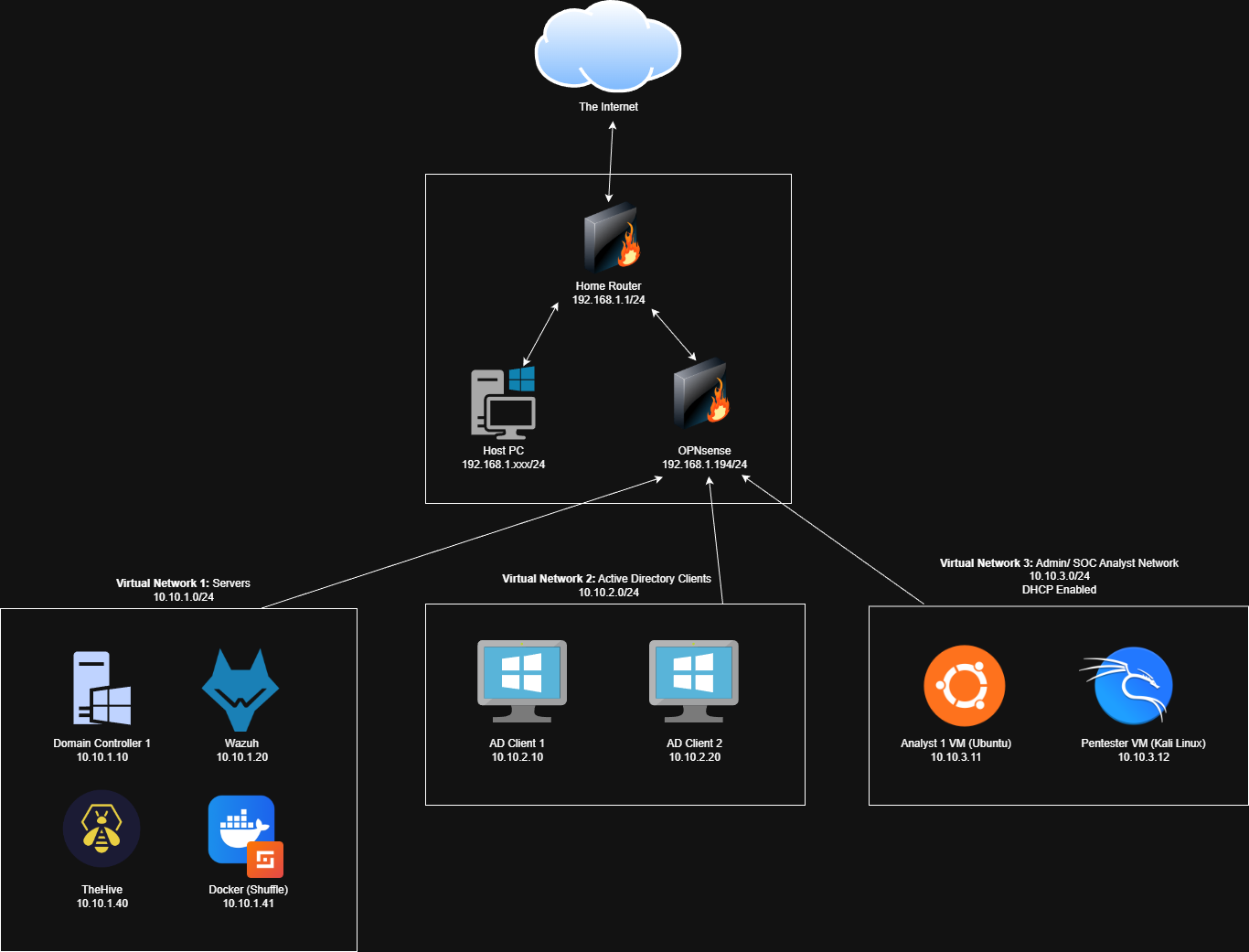
Again, you do not need to run every single VM for this project. The only VMs I ran were: OPNsense, Wazuh, TheHive, Docker, AD Client 1, and Ubuntu. OPNsense may not be necessary for your setup, however it serves as a router for all my VMs.
This project is doable on the cloud, however you will need to be mindful of network configurations. I do not recommend going with a hybrid approach (some VMs on the cloud, some locally hosted) unless you know what you’re doing.
Since this is a full on prem setup, we will need 2 additional Ubuntu server VMs: one hosting TheHive and the other hosting Shuffle.
Note: I am using VirtualBox Version 7.1: https://www.virtualbox.org/wiki/Download_Old_Builds_7_1
Walkthrough
- Ubuntu Server VM Setup
- Installing TheHive Dependencies
- TheHive Configuration
- Shuffle Installation via Docker
- Shuffle Workflow
- Wazuh Active Response
Results
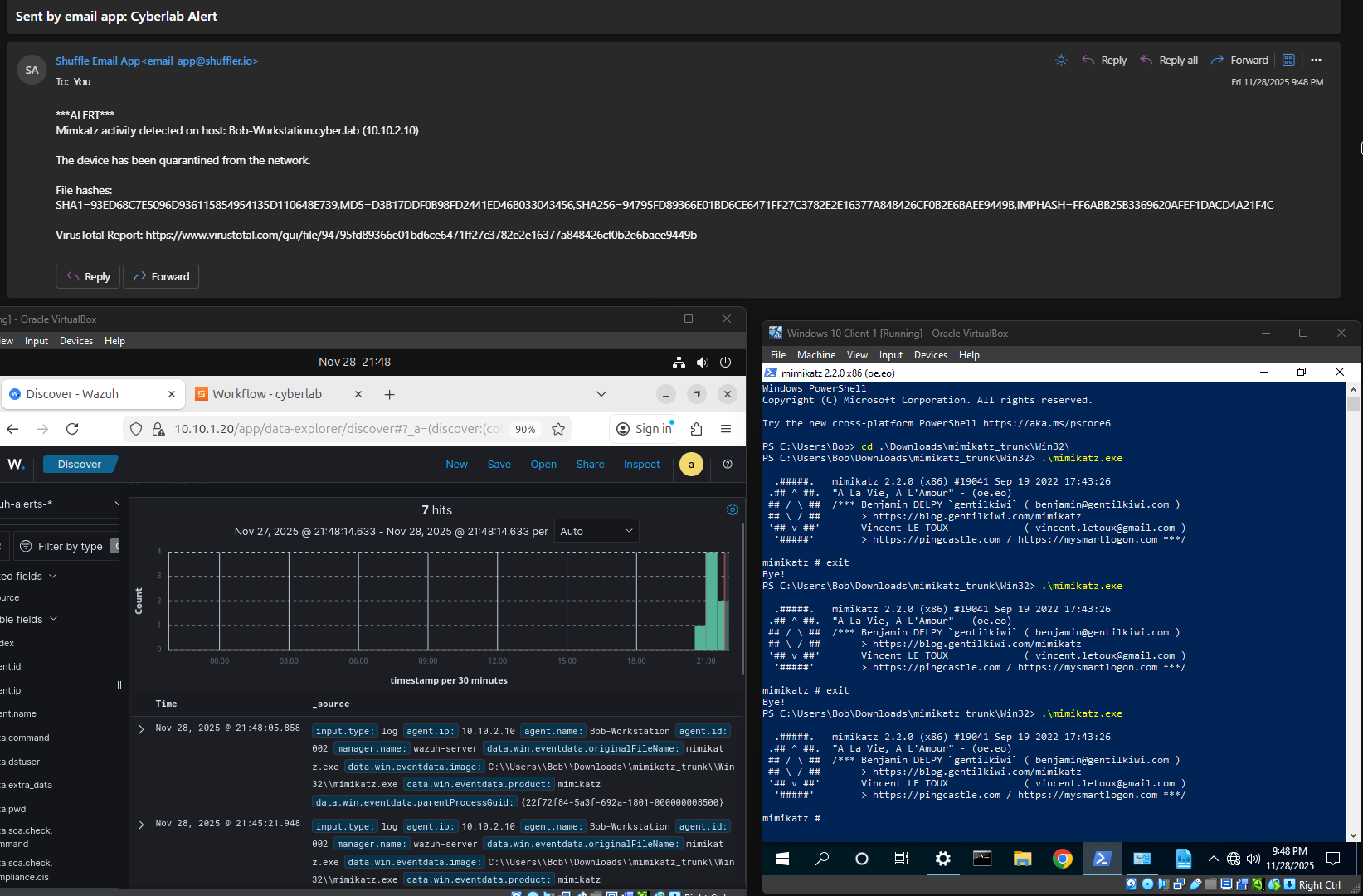
The Wazuh AR rule successfully quarantined the endpoint (Windows 10 VM) that had Mimikatz activity detected on it.
Notice the timestamps of all the events; this happened almost instantaneously.
Flow: Mimikatz executed → Log (Rule: 100002) sent to Wazuh → Wazuh Active Response triggered on host/ host quarantined → Email sent via Shuffle
Challenges & Troubleshoooting
- Hybrid environment connectivity issues
At first, I was running everything locally except for Shuffle. However, Shuffle Cloud was unable to integrate with my locally hosted TheHive server due to network isolation. TheHive was running inside a private VirtualBox network with no public routing, meaning Shuffle Cloud had no path to reach the API. NAT, firewall rules, and the non-public nature of the homelab prevented inbound connections.
I resolved this by deploying Shuffle locally instead, within the same internal network as TheHive. This allowed direct API communication.
Exact error message:
1
2
3
  Timeout error (2) within 30 seconds (2). This happens if we can't reach or use the API
  you're trying to use within the time limit. Configure SHUFFLE_APP_SDK_TIMEOUT=100 in
  Orborus to increase it to 100 seconds. Not changeable for cloud
- Shuffle API version mismatch
The Shuffle GitHub repository defines DOCKER_API_VERSION=1.40 by default. However, Shuffle apps and integrations (ex. VirusTotal, TheHive) require Docker API version 1.44. The error message clearly pointed to a Docker client version mismatch.
I resolved this by updating DOCKER_API_VERSION to 1.44 in both Shuffle/.env and Shuffle/docker-compose.yml, then re-running docker compose up -d.
Exact error message:
1
2
3
  Failed to auto-activate the app: Error in Docker build: Error response from daemon:
  client version 1.40 is too old. Minimum supported API version is 1.44, please
  upgrade your client to a newer version
- Wazuh AR script execution issues (Windows)
Initially, I attempted to use a PowerShell script for the quarantine logic, but it never executed when the rule triggered. Wazuh AR doesn’t support specifying an interpreter, so PowerShell scripts (.ps1) cannot run directly.
My workaround was to implement minimal quarantine logic in a .bat file and have Wazuh AR execute the batch file. .bat files can also serve as wrappers to invoke PowerShell, allowing more complex logic when needed, but for this lab it wasn’t necessary.
Learning Outcomes
- Developed practical understanding of Wazuh rule tuning and Active Response execution
- Improved troubleshooting skills related to VM segmentation and routing
- Gained hands-on experience building automated detection and response pipelines
- Increased proficiency with security orchestration using Shuffle, VirusTotal API integration, and workflow logic
- Strengthened understanding of incident response concepts and phases