Cybersecurity Lab
A virtualized Active Directory and security operations center (SOC) environment using free and open source solutions (for the most part).
This lab is retired, see the updated lab here
Objective
The goal of this lab is to learn cybersecurity tools and concepts through both the lens of the blue team and red team (essentially, purple teaming). Additionally, an Active Directory environment is set up to simulate a small corporate network.
Technology Stack
Operating Systems: Linux (Ubuntu, Debian, FreeBSD), Windows (Server 2025, 10 Enterprise Edition)
Technologies Used: Active Directory, firewalls, routing, security information and event management (SIEM), extended detection and response (XDR)
Solutions Used: OPNsense, Wazuh, Sysmon, Kali Linux, OpenVAS
Topology
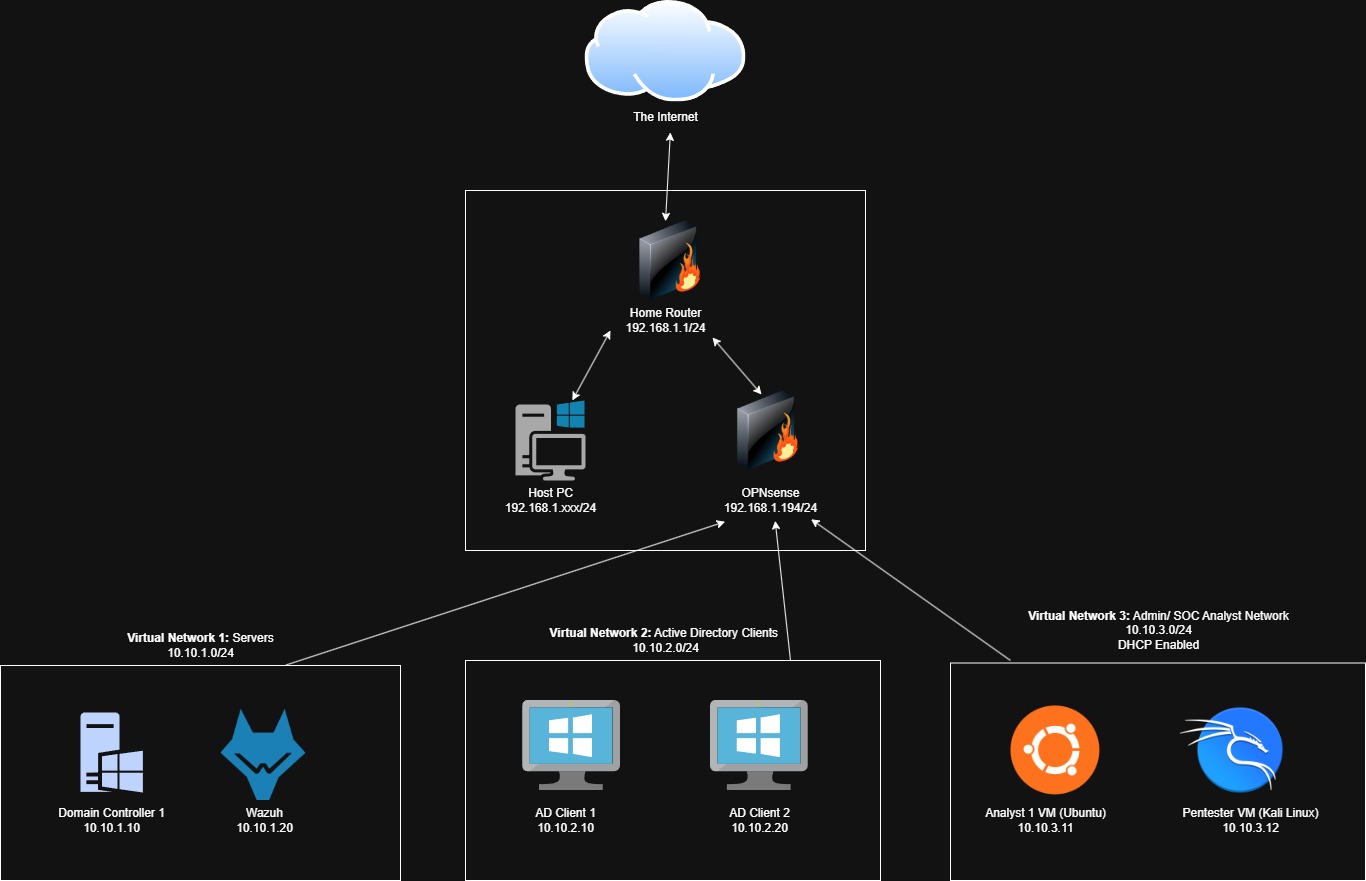
I wanted the lab VMs to be completely isolated from my home network, host machine, and the Internet. That is, the lab VMs should not be visible to my home network, and vice versa.
I achieved this isolation by using an OPNsense VM as a router/firewall for all lab VMs. The lab VMs get Internet connectivity via the OPNsense router, and the OPNsense router gets Internet connectivity via my home router. Essentially, the lab VMs are behind 2 layers of firewalls. Internet connectivity is necessary for some VMs for updates or APIs used by some of the solutions. If the OPNsense VM is not running, none of the VMs will have Internet connectivity and will not be able to communicate with other VMs.
OPNsense has 4 adapters configured:
Adapter 1 (Bridged): The OPNsense VM is treated as an actual device on my home network, so it gets an IP address and Internet connectivity from my home router.
Adapter 2 (Internal network 1): This network will consist of any server VMs for the lab, such as the Domain Controller and Wazuh.
Adapter 3 (Internal network 2): This network will consist of Active Directory clients, which currently consists of 2 Windows 10 VMs.
Adapter 4 (Internal network 3): This network will consist of VMs to perform any administrative or SOC-related tasks (mainly Linux based VMs).
Note: The topology may change depending on what I do in the future (adding or removing VMs, creating a DMZ, etc.)
Current topology:
Hardware Specs
Since I am hosting a lot of VMs locally (not in the cloud) my main PC is pretty beefy:
CPU: i7-14700K (20 cores, 28 logical processors)
RAM: 64 GB
Storage: 2 TB SSD
I would recommend similar specs if you plan on creating a lab like this one
VM Setups and Exercises
The VM setups and exercises are written in a detailed, step-by-step manner to serve as documentation for the entire project, and in case anyone would like to replicate my setup.
Initial Lab Setup
- OPNsense Firewall Setup
- Ubuntu Desktop Setup
- OPNsense Firewall Configurations
- Domain Controller Setup
- Windows 10 Client Setup
- Wazuh Setup
- Kali Linux Setup
Active Directory Exercises
Blue Team Exercises
Red Team Exercises
- Soon