Cybersecurity Lab
Updated cybersecurity lab
Summary
This homelab simulates a segmented enterprise network consisting of production services, Active Directory infrastructure, dedicated security tooling, and a DMZ. The goal of this lab is to:
- Practice network segmentation and firewall rule design
- Simulate red team and blue team activity
- Test detection and logging with Wazuh and Security Onion
- Perform vulnerability management with OpenVAS
- Harden services and analyze attack telemetry
Hardware & Virtualization Layer
Hardware Specs
My entire lab is hosted locally.
CPU: i7-14700K (20 cores, 28 logical processors)
RAM: 64 GB
Storage: 2 TB SSD
I would recommend similar specs if you plan on creating a lab like this one. See the Virtual Machines Overview table for the total hardware utilization.
Virtualization Platform
I switched from VirtualBox to VMware Workstation because I found that VMware has faster VM boot times and it is easier to set up virtual networks compared to VirtualBox.
Link: https://www.vmware.com/products/desktop-hypervisor/workstation-and-fusion
Network Architecture
Logical Topology
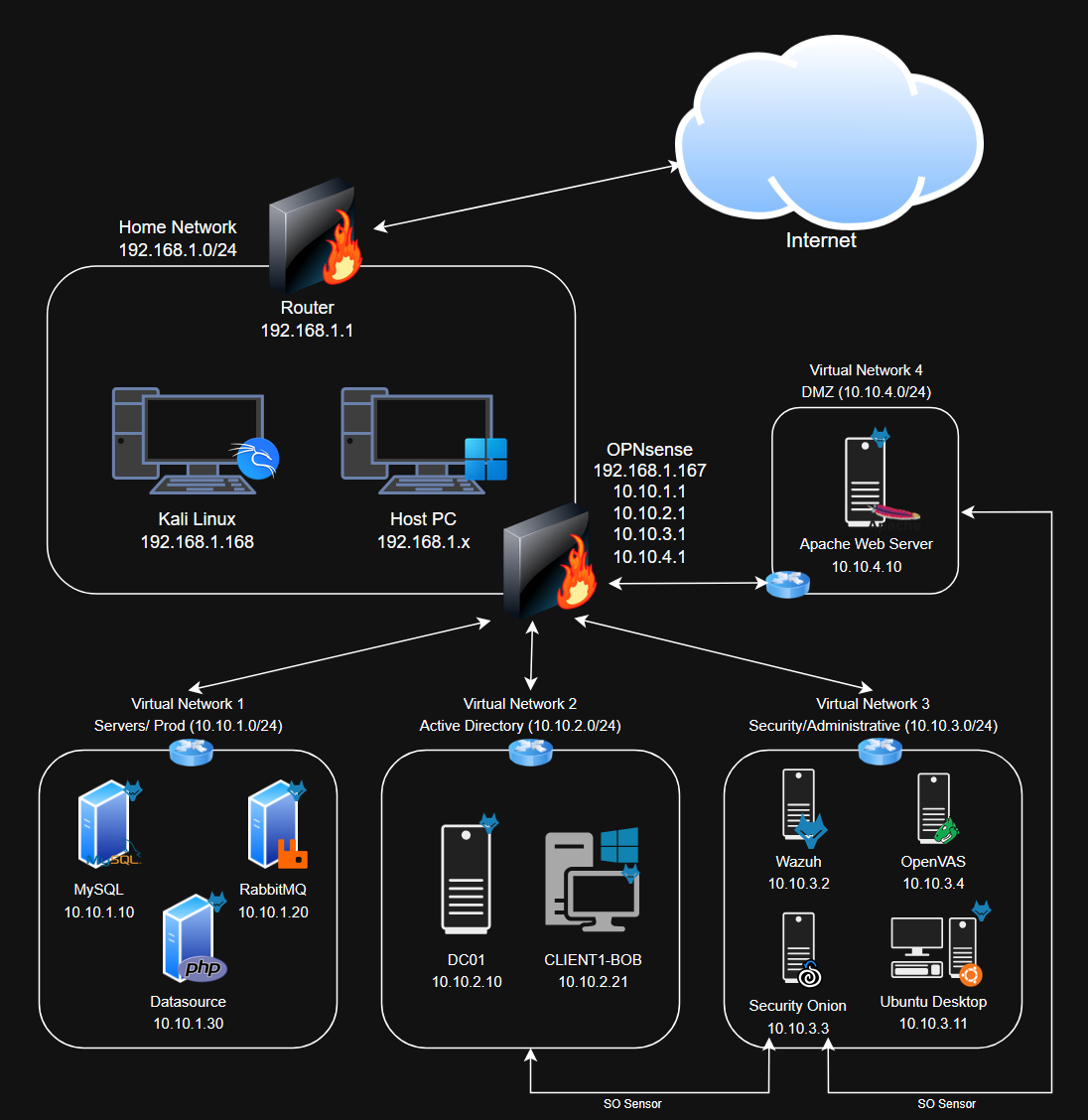 Last updated: 2/24/26, after completing the data exfiltration exercise (Added an SO sensor to the AD network)
Network Architecture Overview
In my setup, the main networks are the home network (192.168.1.0/24) and the internal network (10.10.0.0/16). The internal network encompasses all 4 virtual networks.
OPNsense acts as the central routing and segmentation enforcement point. OPNsense is essentially the bridge between different internal networks, as well as internal networks and the home network. Internal networks reach the Internet the same way as devices on the home network: through the router (192.168.1.1). So if OPNsense is offline, internal networks cannot communicate with each other, with the home network, or the Internet.
Internal networks are essentially behind 2 layers of firewalls.
| Network | CIDR | Purpose | VMs |
|---|---|---|---|
| Home (WAN) | 192.168.1.0/24 | Untrusted external network | OPNsense, Kali |
| Prod | 10.10.1.0/24 | Production / Web‑app microservices | MySQL, RabbitMQ, Data Processor |
| Active Directory (AD) | 10.10.2.0/24 | Active Directory domain | DC01, CLIENT1‑BOB |
| Security/Admin (SOC) | 10.10.3.0/24 | Security & admin tools | Wazuh, Security Onion, OpenVAS, Ubuntu Desktop |
| DMZ | 10.10.4.0/24 | Public-facing servers | WebServer |
Virtual Machines Overview
| VM Name | OS | Network Adapters | Key Role(s) | IP Address(es) | Processors | RAM (GB) | Storage (GB) | Wazuh Agent Installed |
|---|---|---|---|---|---|---|---|---|
| OPNsense | FreeBSD | WAN, Prod, AD, SOC, DMZ | Routing, segmentation, port forwarding for WebServer | 192.168.1.167, 10.10.1.1, 10.10.2.1, 10.10.3.1, 10.10.4.1 | 2 | 4 | 20 | No |
| WebServer | Ubuntu Server 24.04 | DMZ | Public-facing web app | 10.10.4.10 | 1 | 2 | 25 | Yes |
| MySQL | Ubuntu Server 24.04 | Prod | Database | 10.10.1.10 | 1 | 2 | 25 | Yes |
| RabbitMQ | Ubuntu Server 24.04 | Prod | Message broker | 10.10.1.20 | 1 | 2 | 25 | Yes |
| Data Processor | Ubuntu Server 24.04 | Prod | Data‑processing/API service | 10.10.1.30 | 1 | 2 | 20 | Yes |
| DC01 | Windows Server 2025 | AD | Domain controller | 10.10.2.10 | 2 | 4 | 60 | Yes |
| CLIENT1‑BOB | Windows 11 Enterprise | AD | AD client | 10.10.2.21 | 2 | 4 | 64 | Yes |
| Ubuntu | Ubuntu Desktop 24.04 | SOC | Sysadmin workstation & blue teamer | 10.10.3.11 | 2 | 4 | 25 | Yes |
| Wazuh | Amazon Linux 2023 | SOC | Host-based SIEM/XDR | 10.10.3.2 | 4 | 8 | 50 | No |
| Security Onion | Oracle Linux 9 | SOC, AD, DMZ | Network-based SIEM and IDS/IPS, monitoring AD and DMZ networks | 10.10.3.3 | 8 | 16 | 200 | No |
| OpenVAS | Ubuntu Server 24.04 | SOC | Vulnerability scanning | 10.10.4.4 | 4 | 8 | 150 | Yes |
| Kali Linux | Kali Linux 2025.4 | WAN | Red teamer/external attacker | 192.168.1.168 | 1 | 2 | 50 | No |
WAN is synonymous with the home network. WAN means that the adapter is set to Bridged. This means that VMs are treated like actual devices on the home network, getting an IP address via DHCP from the home router.
Security Onion does not get an IP address for the AD and DMZ networks. It is strictly there to monitor traffic on those interfaces.
Total Processors: 29
Total RAM: 58 GB
Total Storage: 714 GB
With my hardware, I can run all VMs at the same time without any issue, however it is not necessary most of the time.
Security Stack
- Wazuh (v4.14.2)
- Host visibility wherever the agents are installed
- Primary SIEM for host-based telemetry
- Sysmon for Windows-based endpoints, syslog for Linux-based endpoints
- XDR capabilities with Active Response
- File integrity monitoring
- Security Onion (v2.4.200)
- Network visibility for all interfaces
- Primary SIEM for network-based telemetry
- Firewall logs, NetFlow logs, Zeek
- Packet capturing and monitoring for the AD and DMZ networks
- OpenVAS
- Deployed via Docker
- Vulnerability scanning
- Compliance scanning
Web Application Stack
The application is a simulated crypto exchange utilizing a microservice architecture. See Systems Integration for more information. I am only deploying 1 cluster due to the sheer amount of VMs I already have in this lab.
- Web Server (DMZ)
- Apache2
- HTML/CSS/JavaScript frontend
- PHP backend
- Exposed to the WAN via port forwarding
- Backend services - should theoretically be completely isolated from the WAN and have strict firewall rules
- MySQL (Prod)
- RabbitMQ (Prod)
- Data Processor (Prod)
- API worker in PHP
Lab Setup
Most of these are not full-fledged tutorials, as the setup process for some of the components are very similar to the previous lab. I have provided links when necessary.
Attack Simulations
Attack and incident response scenarios.
Remediation/ Lab Updates
Addressing any weaknesses/vulnerabilities identified from previous attack scenarios.
Extras
Active Directory and Wazuh exercises recycled from my previous lab.